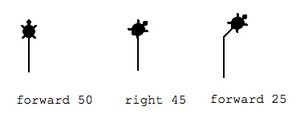
Three kids were staring at their computer screen on Tuesday when they gasped so loudly everyone came running. Their screen was filled with multicolored stars. "HOW'D YOU DO THAT?!" everyone wanted to know. Soon the class scurried back to their computers to try out the new idea.
For our geometry theme, I introduced students to the Logo programming language. When kids program, they control the computer – the alchemy of words and numbers turning into designs on the screen is magic. Working collaboratively, they experiment, fail, recalibrate and try again. One pair makes a breakthrough and soon others are using it in their programs. The speed of their learning is amazing.
I began the class by teaching two simple commands – forward and right turn. I explained that a number after forward instructs the turtle how many pixels to move forward. A number after the turn command tells the turtle how many degrees to turn — we reviewed the idea of degrees, too.
I set the class the challenge of making a regular square, triangle, hexagon and pentagon. Regular polygons have the same size sides and angles and are therefore perfect for Logo — one can take a shortcut to repeat the same command over and over.
Some kids take a lot of trials to find the right angle to turn. "That's too far!" "That's too little" and so on. It's through those trials that they really come to understand how the polygons are made. After you have tried 10 times to get the angle on an equilateral triangle — you are much more likely to remember it!
The Logo simulator we're using has some sample programs on the side bar. As children got braver in their risk taking, they began trying these programs out, tinkering with variables to see how it changed things. Kids soon figured out how to add variables to their programs and how to teach their computer new commands. Very soon, they were asking me questions I didn't know the answer to and we were trying to learn together.
Programming like this highlights the idea that math questions seldom have a single solution approached from a single direction. It is a creative endeavor in which one's journey may wind a little as you find your way. Every step is useful, even if you end up backing up and taking another tack in the end (how many more transportation metaphors can I fit into this paragraph?) At the end of one class, most kids agreed they liked being able to figure things out on their own instead of being given a set of instructions.
Here is the site we use: http://www.calormen.com/jslogo and here is a list of basic commands
Download Logo commands. I hope you and your child get a chance to play soon. MMM


 The Rookery
Leave a comment